I'm not getting AI-generated posts after uploading an album
Written By Nick
Last updated 20 days ago
If you've uploaded photos to an album and posts haven't shown up yet, one of a few things is usually going on. Posts appear under For Approval on your posts page once they're generated.
Common causes
The album hasn't been authorized for publishing. This is the most common cause. Albums start in Draft status after creation, and post generation doesn't start until you click Authorize Publishing (or Set to Publishing) on the album page. Until you take that step, no posts are created. Draft is intentionally a holding state so you can review photos and album details first.
Photo analysis is still running. Generation kicks off once every photo in the album has finished analysis. If you uploaded a large batch, give it a few more minutes and check back.
The album has no photos. Generation needs photos to work with. Upload photos to the album, then authorize publishing.
A specific platform isn't connected. Generation runs for whatever you've connected. If Pinterest isn't connected, for example, no pins will generate for the album. Check Settings → Platform Management and look for any platform marked Not connected.
Generation hit an internal failure. Rare, but possible. If the album is in Publishing status, every photo has been analyzed, and posts still aren't appearing after several minutes, contact support.
What to expect once generation starts
After you authorize publishing on an album with analyzed photos, posts typically appear under For Approval within a few minutes. While they're being prepared, the album page shows an in-progress notice. You can also see counts update in the album sidebar (For Approval, Approved, Published).
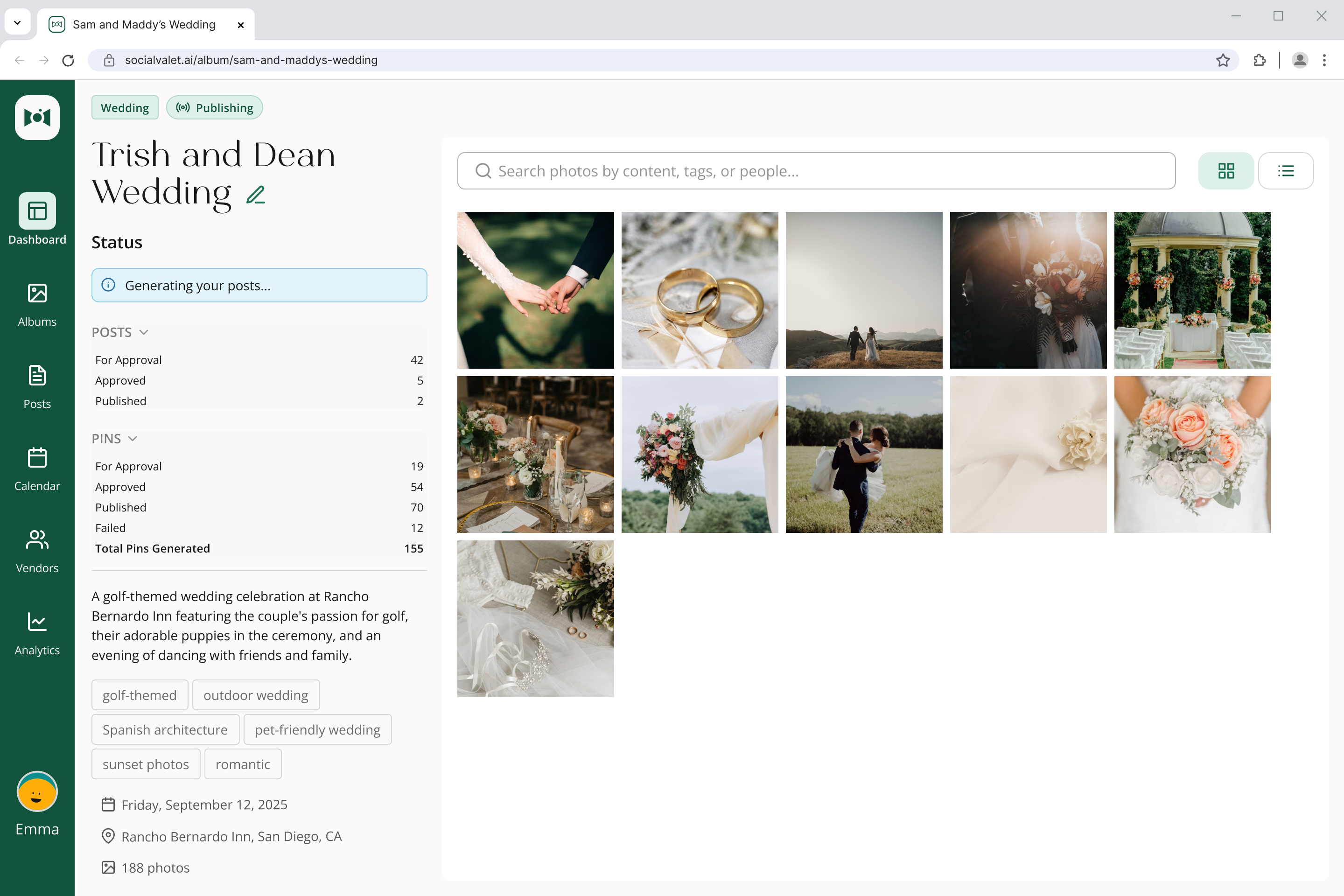
Pinterest pin generation is resilient. A single pin that fails validation doesn't stop the rest of the batch. If some pins from an album show up but you're missing a few, the ones that failed are the exception, not a sign that the whole run broke.
When an album's posts are all used up
You don't have to restart anything to get more posts from an album. Once every post of one type in the album (for example, all of its Instagram posts) has been approved and scheduled, Social Valet automatically generates more of that type, and the in-progress notice appears on the album while it works.
If some posts of that type are still in For Approval, or approved but not yet scheduled, the next round waits. Approve them, then click Schedule Next 7 Days on the calendar to schedule them right away.
Manually generating additional posts
If you want more Instagram posts from the album right away, you can also generate additional posts manually. Manual Instagram post generation isn't blocked by existing unapproved posts on the album. Head to the album's manual post flow to trigger another batch.
If something goes wrong
The album is in Draft. Click Authorize Publishing (or Set to Publishing) on the album page.
The in-progress notice is showing but no posts have appeared. Generation is still running. Give it a few minutes and refresh.
You've worked through the first batch and nothing new is generating. Check for posts of that type still in For Approval or waiting to be scheduled. Every one has to be approved and scheduled before the next round starts.
The in-progress notice never appeared and there are no new posts. Confirm the album is in Publishing status, every photo has finished analyzing, and at least one platform is connected.
Nothing has appeared after several minutes and everything above checks out. Contact support with the album name.
Next steps
Was this helpful?
Still need help? Ask the team