Changing your plan
How to upgrade, downgrade, or switch between monthly and annual billing, and what changes when you do.
Written By Nick
Last updated About 12 hours ago
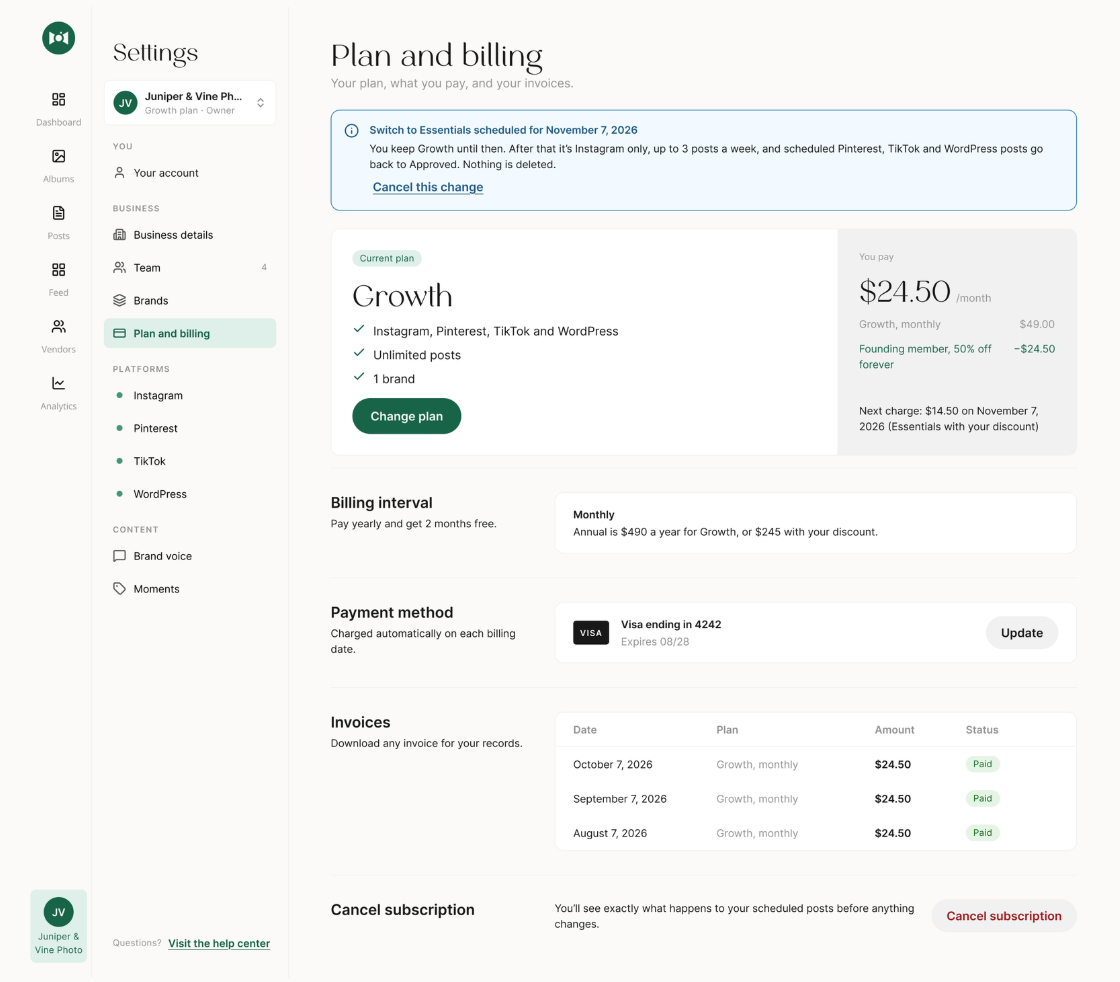
You can change your plan anytime from Settings → Billing and Subscription. Upgrades take effect right away. Downgrades and billing interval changes wait until the end of your current billing period, so you get everything you've already paid for.
Only the person who holds the subscription can change the plan. On Studio, that happens from the primary brand's billing settings.
Upgrading
Go to Settings → Billing and Subscription.
Click Change plan and pick the plan you want. You can also start an upgrade from any upgrade prompt in the app, such as a locked platform or the "approved posts ready" banner.
Review the upgrade screen. It shows what you'll pay today (prorated for the rest of your current period) and the full price starting on your next billing date.
Confirm.
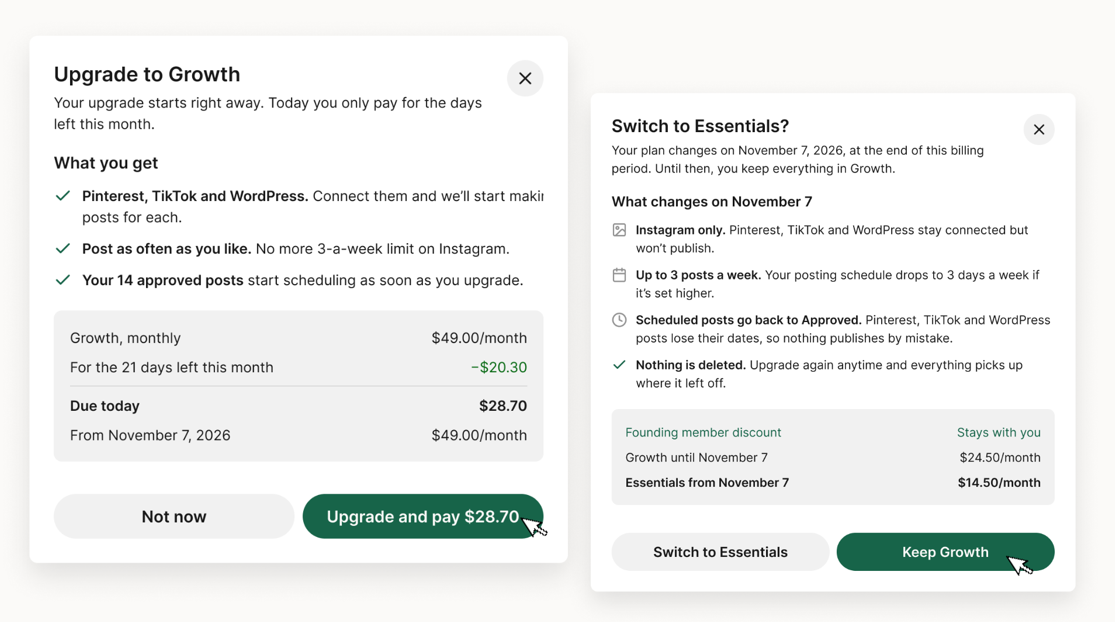
The upgrade takes effect immediately, and the new features are available without refreshing the page.
Upgrading from Essentials: if you had a different Instagram posting frequency before you moved to Essentials, it's restored. Approved posts on every platform get scheduled again.
Upgrading to Studio: the brand you upgrade from becomes your primary brand, and you can add up to two more. See Managing multiple brands with Studio.
Downgrading
Go to Settings → Billing and Subscription and click Change plan.
Pick the lower plan. The downgrade screen lists exactly what will change.
Confirm.
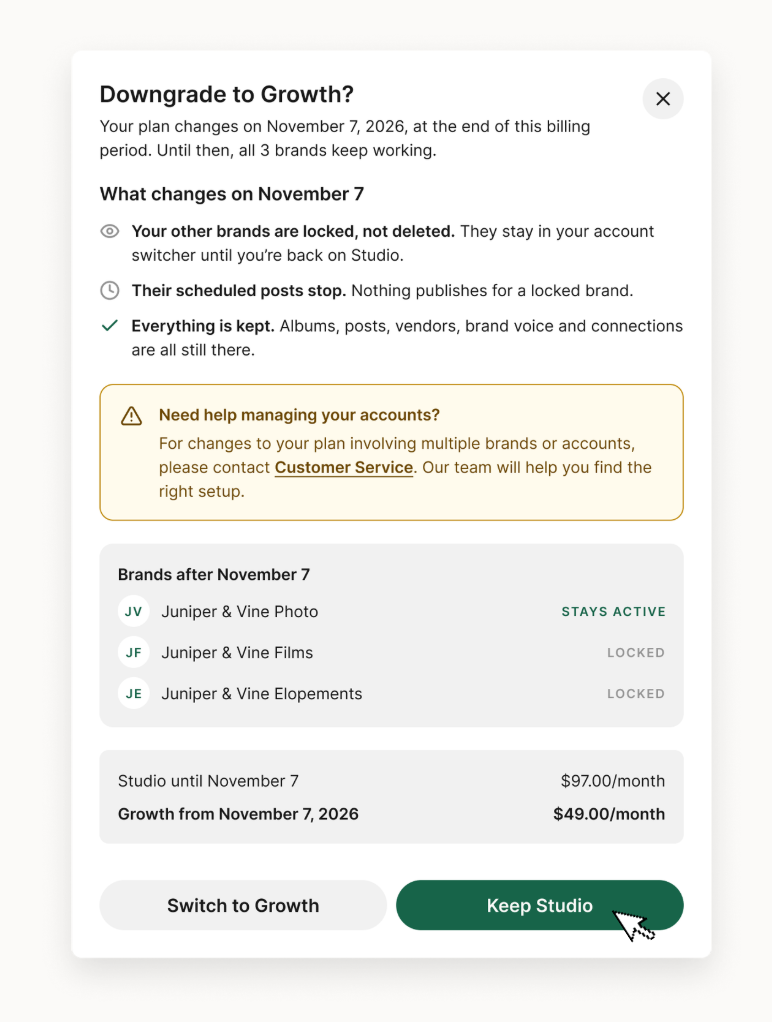
The downgrade is scheduled for the end of your current billing period, or the end of your trial if you're still in it. There's no proration or refund for the time left, and you keep your current plan until then. Your Billing page shows the scheduled change and its effective date. Click Cancel this change anytime before then to stay on your current plan.
When a downgrade to Essentials takes effect
Instagram posting frequency is capped at 3 days a week. If you were on Automatic, it becomes 3.
The next week is re-planned to a maximum of 3 Instagram posts. Any extra scheduled Instagram posts go back to your Approved bench.
Scheduled Pinterest, TikTok, and WordPress posts go back to Approved, and their dates are cleared. They'll schedule again if you upgrade.
Your platform connections stay connected.
Nothing is deleted. Posts, albums, and connections all stay.
Downgrading from Studio
Studio is the only plan with more than one brand, so when you downgrade from Studio, you choose which brand stays active. Your primary brand is selected by default.
The brand you choose keeps running on the new plan. If it isn't your primary brand, it becomes the primary, and your subscription moves to it.
Your other brands are locked. A locked brand can't be opened, its scheduled posts are paused, and nothing is generated, published, or emailed for it.
Nothing is deleted. If you upgrade back to Studio, your locked brands unlock right away. Paused posts go back into scheduling, and any whose time has already passed return to your Approved bench.
Want to keep another brand running on its own plan? Choose Contact us on the downgrade screen and we'll set it up for you.
Switching between monthly and annual billing
Go to Settings → Billing and Subscription.
Click Change billing interval. The confirmation shows when the change takes effect and what you'll be charged.
Confirm.
Monthly to annual: takes effect at the end of your current month, and the annual price is charged then.
Annual to monthly: takes effect at the end of your annual period, and monthly billing starts then.
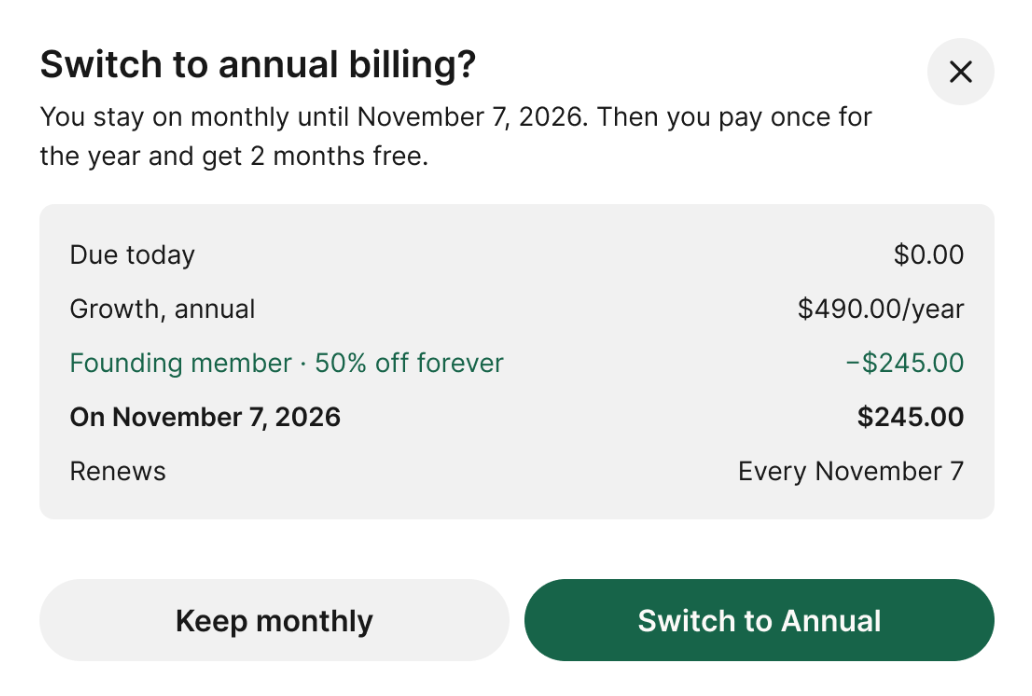
You can have only one scheduled change at a time. If you request a new one, it replaces the change that's already scheduled.
If something goes wrong
Your card was declined during an upgrade. The error appears on the upgrade screen, and your plan stays the same. Update your card through Manage Subscription, then try again.
You don't see Change plan. You're probably in a secondary Studio brand, where billing says "Billed through" your primary brand. Switch to your primary brand to make changes. If you aren't the subscription holder, ask whoever is.
You changed your mind about a downgrade. Click Cancel this change on the Billing page before the effective date.
A brand is locked after a downgrade. Upgrade back to Studio to unlock it, or contact us to move it to its own plan.
Approved posts aren't publishing after you moved to Essentials. Essentials publishes up to 3 Instagram posts a week and doesn't publish to Pinterest, WordPress, or TikTok. See Choosing a plan: Essentials, Growth, and Studio.
Next steps
Was this helpful?
Still need help? Ask the team