Pinterest analytics
How to read the Pinterest tab in Analytics and what each metric measures.
Written By Nick
Last updated About 2 months ago
The Pinterest tab is where you understand how your pins and boards are performing.
Pinterest analytics behave differently from Instagram, so this tab is designed around the Pinterest-specific signals that actually matter.
What's on the Pinterest tab

Pin impressions. How many times your pins were shown in Pinterest feeds and search.
Saves. The strongest Pinterest engagement signal. When someone saves a pin, they're keeping it for later.
Outbound clicks. How many people clicked through to the destination link on your pins.
Per-pin performance. A ranked list of your pins in the selected window.
Board activity. How each board is contributing to overall performance.
How Pinterest data is pulled
Pinterest metrics come directly from the Pinterest API, refreshed daily. Newer pins accumulate metrics over weeks and months, not hours, so give recent pins time before judging performance.
Reading pin impressions vs saves vs clicks

Pinterest performance is a funnel:
Impressions tell you how discoverable a pin is.
Saves tell you how compelling it is once discovered.
Outbound clicks tell you whether the pin's promise matches what's on the other end of the link.
A pin with high impressions and low saves usually has a thumbnail problem. A pin with high saves and low clicks usually has a destination mismatch.
Reading board activity
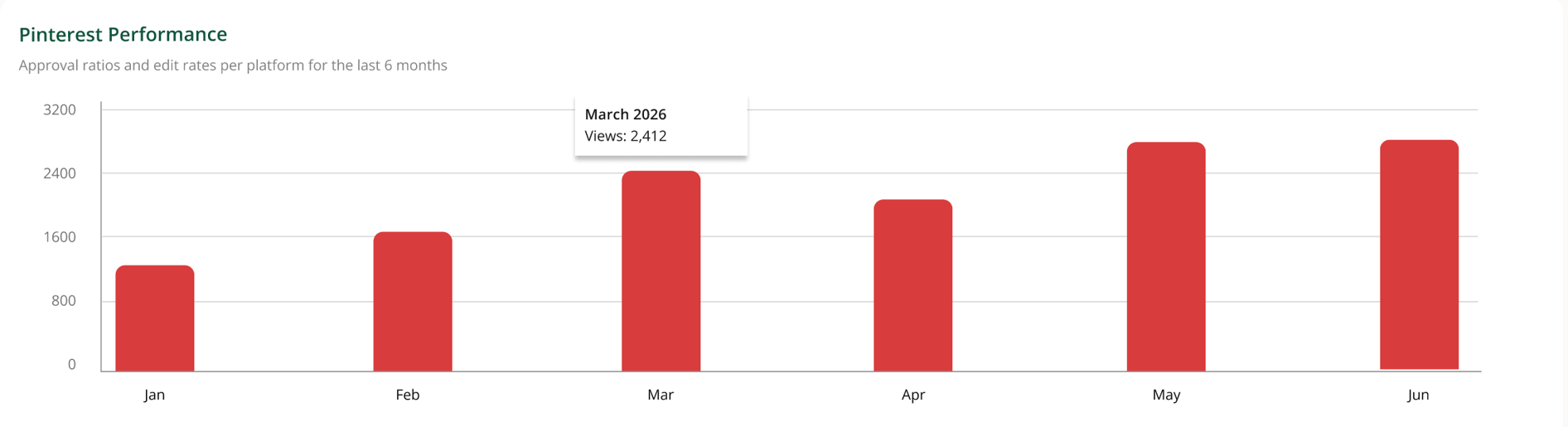
Board activity shows which boards are pulling their weight. Some boards accumulate savers over time and drive most of your traffic. Others get neglected. This view helps you decide where to focus your board strategy.
If the tab is empty or incomplete
Pinterest isn't connected. The tab explains this and links to the connection article.
Your Pinterest account is brand new. Pin performance takes weeks to build. Don't expect meaningful data in the first few days.
A recent pin has no data yet. New pins can take 24 to 48 hours to start showing impressions.