Social Valet activity metrics
What the Social Valet tab shows about content generation, workspace activity, automation health, and vendor collaboration.
Written By Nick
Last updated About 2 months ago
The Social Valet tab

The Social Valet tab shows how Social Valet itself is contributing. It's less about platform performance and more about the workflow: how much content is getting generated, whether your automations are healthy, and how vendors are collaborating with you.
What's on the Social Valet tab
The tab has four sections, in this order:
Content Output
How much content Social Valet has generated for you in the selected window:

Instagram posts generated
Pinterest pins generated
Blog posts generated
Videos processed
This is the "how much work did Social Valet do" view. It's useful for justifying time saved and for spotting weeks where generation slowed down.
Workspace
Activity across your team and your albums:

Albums created and set to Publishing
Posts approved, rejected, or edited
Team member activity (who's approving what)
If you have team members with different roles, this section gives you a picture of how the workload is distributed.
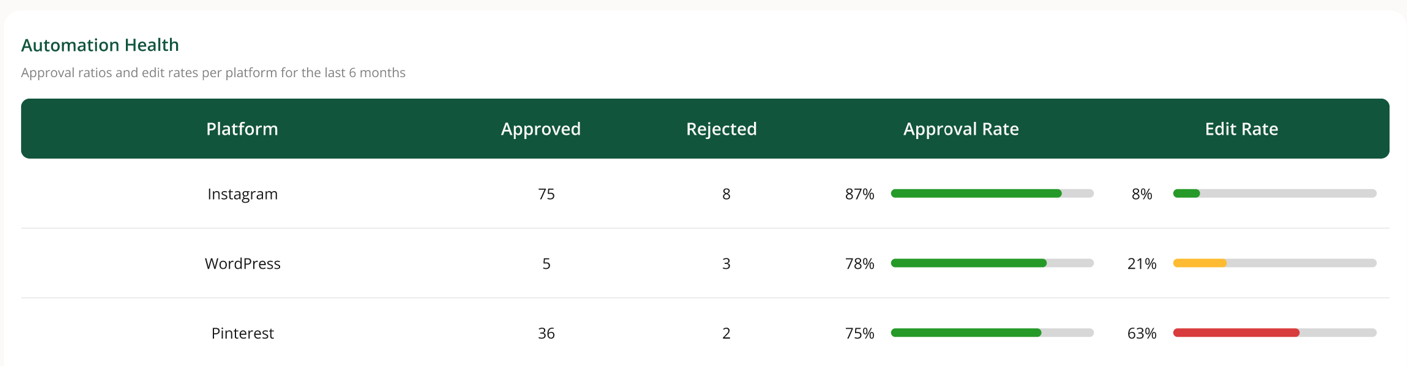
Automation Health
The reliability signals for anything Social Valet is doing on autopilot:
Auto-scheduling status
Publishing success rates by platform
Failed post counts by platform
Connection expiration warnings
If Automation Health flags something, it's worth acting on. A silent connection expiration can lose you days of scheduled content.
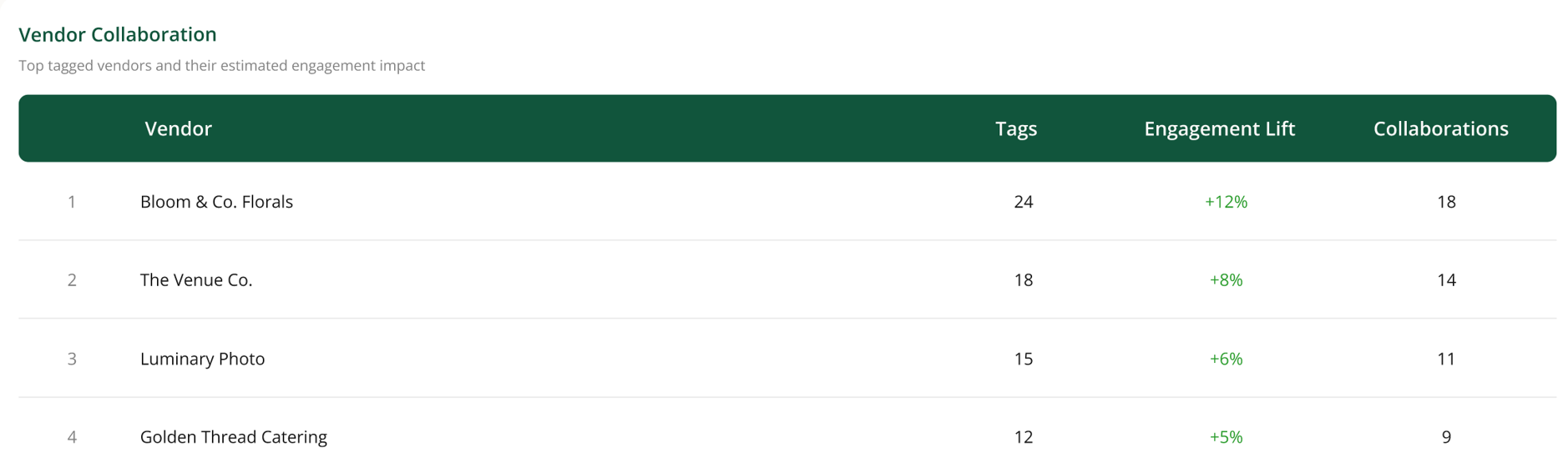
Vendor Collaboration
How shared albums and vendor tags are being used:
Shared albums sent and received
Vendor tag activity
Cross-account album references
If you rely on vendor collaboration as part of your workflow, this section tells you whether it's actually happening.
Reading the tables
Every table on this tab responds to the time-range selector. Change the range and every number updates.
If a section looks off
Content Output shows zero for a platform. Confirm the platform is connected. Disconnected platforms don't get content generated.
Automation Health is flagging every album as failing. Check your platform connections first. Expired connections cascade into failed publishing.
Vendor Collaboration is empty. You may not be using shared albums or vendor tagging yet. See the vendor and sharing articles to get started.